Sunday, June 5, 2011

Replacing Color in Photoshop.....

One of my favorite tools in Photoshop is the "Replace Color" tool. I Love this tool because you can get a very unique look after you replace colors. I took this photo of myself with my cell phone. Then I desaturated the photo, I simply went to "Image" then "Adjustments" then "Desaturate" Click where you would like to replace the color, when it chooses your shade, then go to "Replace Color" Choose the color you want, and it will replace it with your new color, its simple and gives your piece a very unique look.
This was a magazine cover I had to design for a college class. We had to desaturate a photo, and recolor only a part of it. So I chose to add the pink and blue. 

Another way to replace color in Photoshop is to desaturate your photo, and choose your paintbrush, then your color, and very carefully and precisely paint the photo, where you want the color to be. I have an example below of a family picture I took of a friends family. I changed the photo to Sepia, then I repainted their jeans blue. The trick is, you have to change the opacity on your brush. Make sure you start a brand new layer, only for your painting. Change the opacity on that particular layer. 
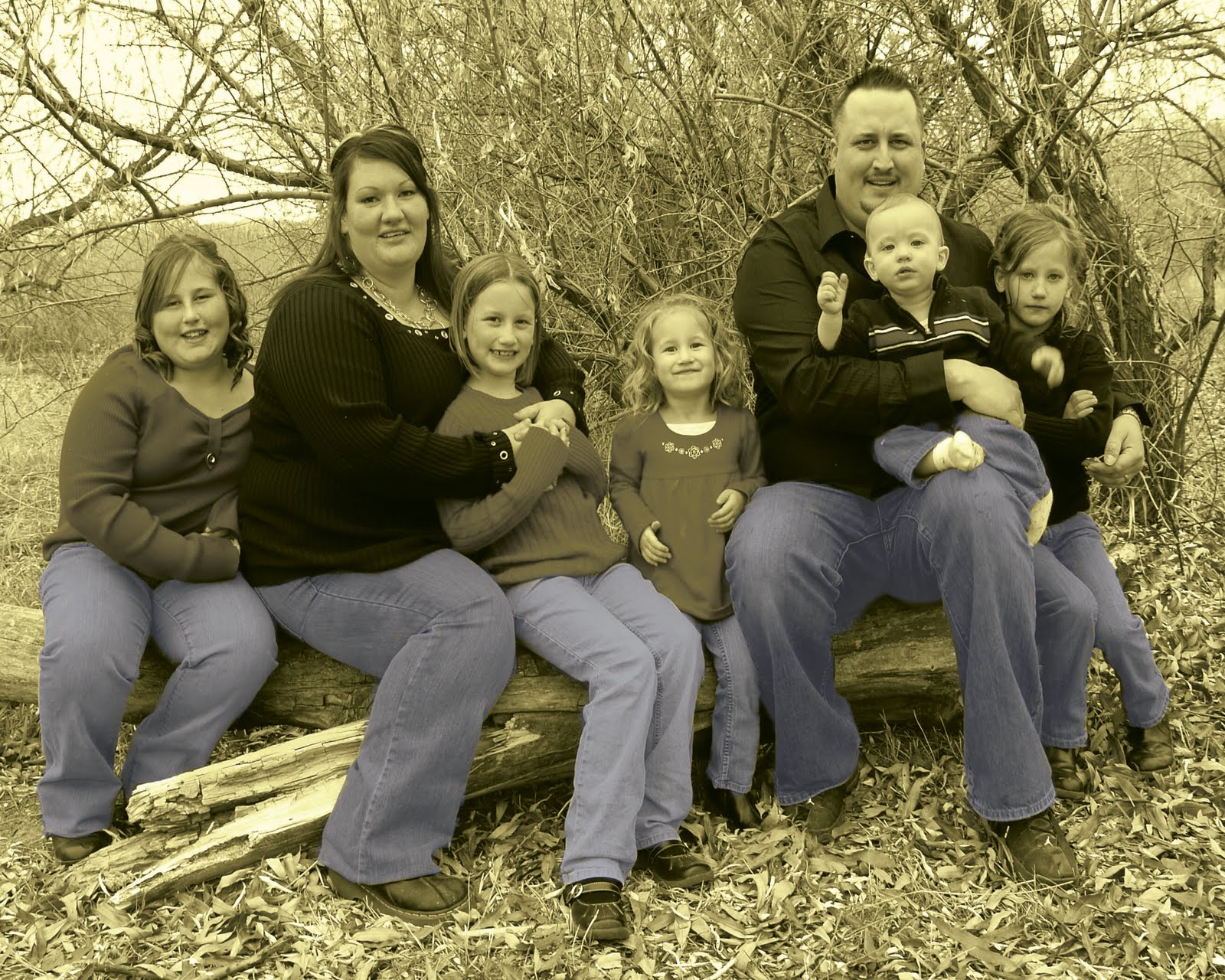
A couple more ideas, are to desaturate the photo, and only paint the flowers. Another idea is to take a close up portrait of someone, desaturate the photo, and repaint only their eyes. Back in the olden days, you have probably noticed photos painted, or dyed. Its basically the same idea, only back then they actually dyed or painted the photo with a special transparent dye. We are lucky now because we can do it digitally! There are countless ideas for this particular tool in Photoshop! You could even take a black and white photo of an old house, and only paint the house. 


New Prints..........

I've been working on a few more prints for fun, check them out......


Fun Vintage Clothing Flyer.........

This was a flyer I designed in InDesign. It was for a vintage clothing company!

D'Laina Jae Photography Logos..................

I designed some Logos for Unmistakably D'Laina Jae Photography. She wanted red and black for the colors. I messed with a few different options.  I used Illustrator and Photoshop. They are posted below.

This is a camera with wings. Something simple, for stamping her photos.

This was also designed for photo stamping.

This was designed for flyers and business cards.

This was just something fun, I messed with.

This was simple and ended up being D'Laina's favorite.

Friday, June 3, 2011

The first official day of summer........


Well today is our first official day of summer break. I actually got to sleep in until almost 9:00. It was so nice. All of my kids stayed the night at friends houses except one, who had a sleep over here. My project for today is to get my house cleaned really good, make a job chart for the kids for this summer, and I am going to try and set up a work space in my new town home! I don't have as much room in this house for my craft space, but I think I have a whole wall in my room I can set up with my sewing machine, and a painting space! The house is quiet, my kids are all out playing. Its nice to have some peace. During the school year I swear I was in my minivan driving kids around to school, from school, and to friends houses the majority of my day. Maybe I will get some stuff done now. The weather is still cold and cloudy, which is really weird for this time of year in Utah! Hopefully I can start laying out in my bikini and get some sun on this white body of mine, if the sun ever comes out, that is!


Tuesday, May 31, 2011

One day and one hour..........

My kids officially have one day and then one hour left on thursday of school.  Honestly I'm not sure if I should be happy or sad about this! I have been enjoying some time alone when they are at school, but I am getting sick of trying to get them up early every morning!  So I'm torn between them being home, and being at school. At least now I will have some time to take some pictures. I'm getting ready to take on the huge job of redesigning an animal sanctuary website for one of my best friends. She owns the Denkai Animal Sanctuary in Grover Colorado. I'm so excited to get her website done, but it is going to take ALOT of work! Lots of information needs to be put on it.  I am going to give it more of a modern look! So that is my goal for the next few days! Wish me luck!
Denkai Animal Sanctuary

Some fun digital collages.................

I have always loved Surreal Art. I remember as a child seeing a few pieces of surreal art, it was then, that I became addicted.  I daydream so much, and I fantasize a lot too. Surreal Art, stimulates my imagination, and helps me think of surreal possibilities of fantasy lands only found in the human mind! I love to get lost in lands of fantasy and wonder. These are a few of my digital collages, I would love to know what you think of them. I created them in Adobe Photoshop! If you have any digital Surreal Art to share I would love to see it, so I can daydream once again, of places found only in my mind!

 I call this photo collage "Castle Lovers" I used about 20 layers of different pictures. I used the transparency setting for the water!

 I call this one "Imagine" It was created in photoshop with mostly the rubber stamp tool!
 I call this one "Young and Old" Created in Photoshop mostly using the Transparency setting!
This was a simple Yoga Poster, I used photos from the Hubbell Telescope then I cut them out, to create the planets. I then used photo shop brushes to create the flowers and ivy.